Video Resolutions Explained: 720p vs. 1080p vs. 4K — What You Really Need to Know.
What is resolution
Think of the screen that you are viewing this on as a painting. A painting made of millions of tiny dots, called pixels. It's like a pointillist painting. Each dot is composed of varying amounts of the three primary colors: red, green, and blue. They are different from what most artists consider to be the primary colors of yellow, red, and blue, because of how light combines to create colors on your screen.
To make your screen look so sharp, with smooth lines for the curves of letters and photos, you need to use A LOT of pixels. If you zoomed in close enough, those smooth curves would reveal jagged edges, like a serrated knife or stair steps. But because there are so many and they are so very tiny, they look nice and small. Those of us who are old enough to remember the early days of computers can visualize what we call "the jaggies". Some of us even pine for the way that looks, going out of our way to find pixel art and play pixelated video games that recreate that aesthetic.
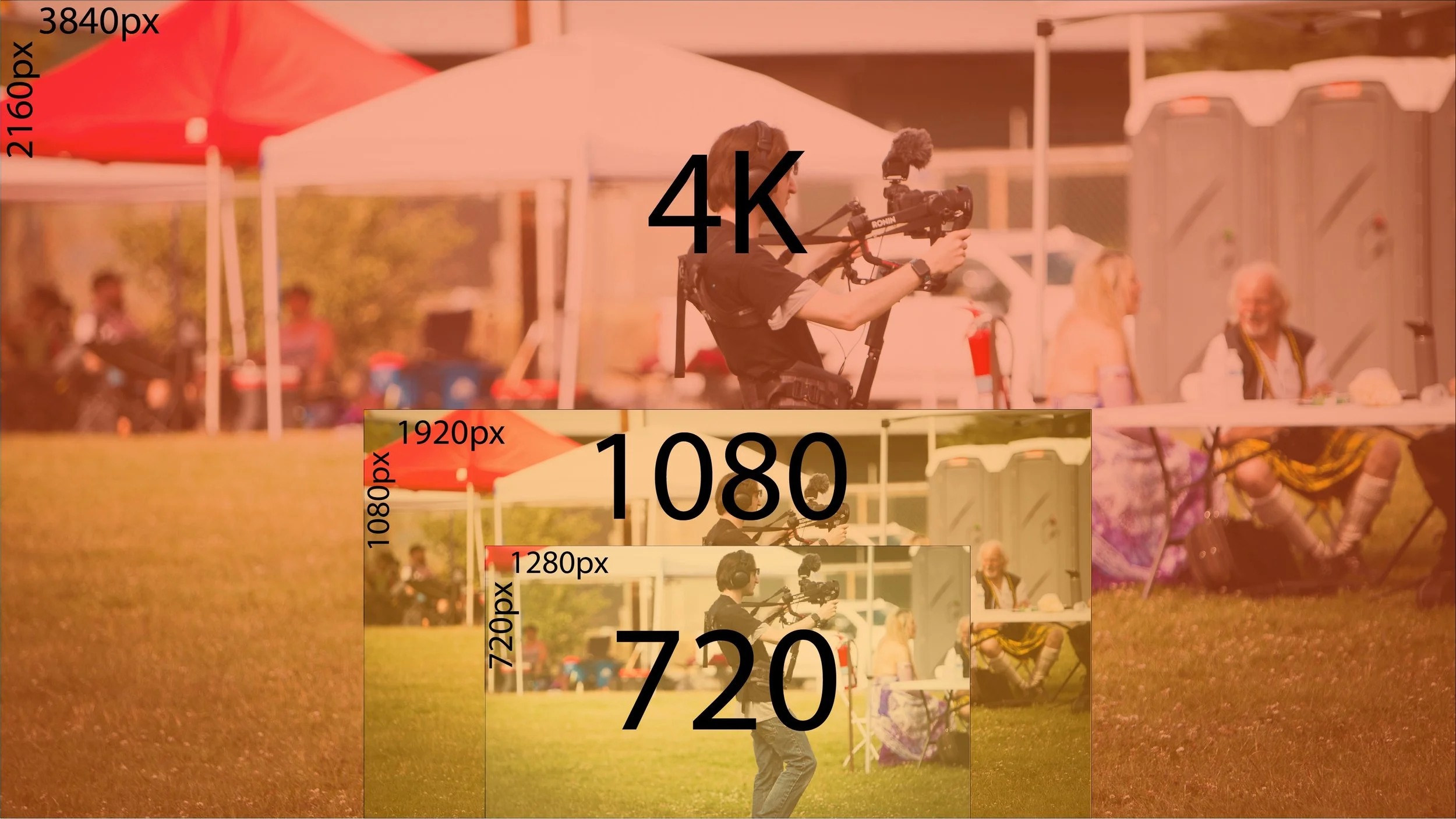
Relative sizes of a photo in 3 different resolutions.
Resolution Sizes
Earlier computers had very low resolution. The Apple II came with a "high res" mode of a whole 280 × 192 pixels. The Macintosh with the first graphical user interface debuted in 1984 with a resolution of 512 × 384 pixels. These resolutions emerged on computers and video game consoles throughout the 1990s, though the CRTs used with them lacked built-in resolution due to their analog nature.
Then came the HD revolution.
720p - The original HD
TVs went from thick tubes to thin LCD panels. Viewers became enraptured by blades of grass on a football field. Some of us signed up for the short-lived Voom to get as much HD as we could. The default TV aspect ratio shifted from 4:3 to 16:9, closer to cinema ratios of 1.85:1 and 2.39:1.
The first widely adopted "HD" resolution was 720p, meaning 1280 pixels wide by 720 pixels tall. The p stands for progressive, rather than interlaced. An interlaced image draws a picture in two passes, interlacing them, while a progressive image draws the frame in a single pass. Progressive has a better image quality, while interlaced requires less bandwidth.
1080p - Full HD
Shortly after 720p came 1080p (and 1080i). 1080 again refers to the number of vertical pixels. A 16:9 1080p screen has a resolution of 1920x1080 pixels. It was marketed as Full HD, offering a significant improvement over 720p screens.
4K - 4x 1080
The era of 4K began in 2013 as prices for even higher-resolution displays fell, though many TVs are still sold at 1080p. 4K is confusing, as the 4K, or 4,000, refers to the horizontal, not vertical, resolution of a display. Also, it is not actually 4K, but rather 3840 pixels wide by 2160 pixels tall. It is important to note that it is exactly 4X the resolution of 1080p.
Horizontal vs Vertical Video
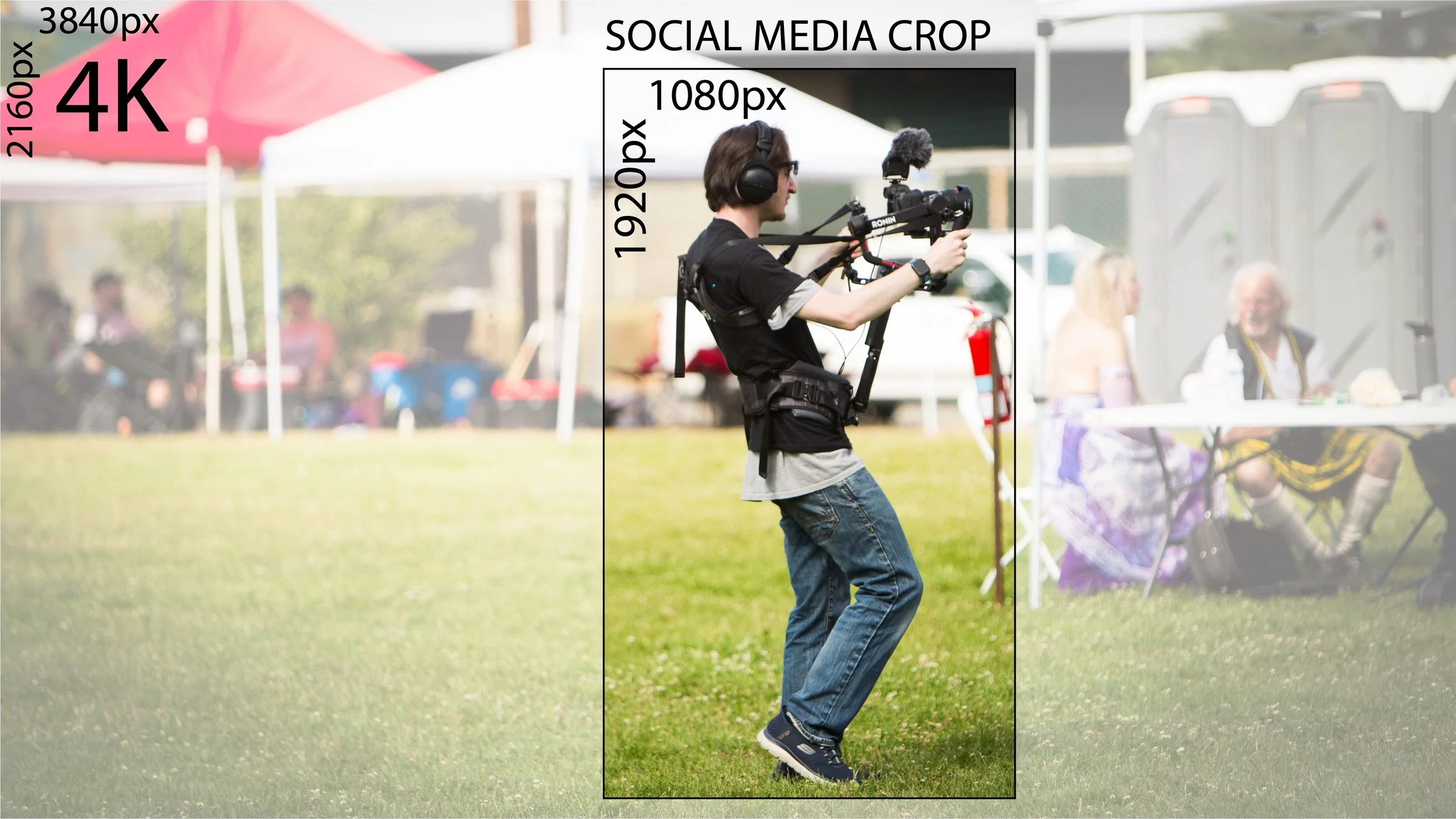
This is how your 4K image will look on a vertical social media crop at 1080p.
With the rise of smartphones came vertical video. Cinema has traditionally been horizontal, as we have two horizontally positioned eyes. We see in a horizontal aspect ratio. However, resolutions are dictated by many things, particularly the device displaying them. While you can hold your phone horizontally, most users scroll through modern social apps in a vertical orientation. This means that if you want your content to be primarily viewed on a mobile device, it is best to shoot and/or render your video in a vertical aspect ratio.
Picking a Resolution to shoot at.
So what's a content creator to do? Well, as in all things in life, it depends.
The standard ratio for vertical video is 1080x1920 pixels. This means you can shoot horizontally at 4K and still have enough resolution to crop to a full 1080x1920. You need to be careful, however, as you could miss parts of what you are trying to capture in a frame if you crop in on a horizontal video, leading to a lot of "Pan and Scan". This is a term from when movies were cropped from their original wide aspect ratios to fit TV. Studios would crop to a TV's 4:3 aspect ratio and pan around the frame to capture the action. Instead of seeing two characters on a single frame having a conversation, you would instead get jumps between the characters. This would impact the cinematography and mood of a shot.
Another thing to consider is your storage capacity. 4K requires far higher aspect ratios, and that's before one gets into frame rates and compression (but that's another post). 4K is four times as many pixels as 1080p, so it will require four times the storage. You need to decide whether you need the extra quality or if 1080p will be enough.
At Stanis Creative, we shoot 4K horizontal on mobile devices. This gives us the flexibility to crop our footage to vertical and combine it with our mirrorless camera footage, which is also 4K and horizontal. We also have high-capacity SD cards for storing the data and take drives on site so we can immediately back up our footage and photos.
Tell us what resolution you are shooting at and why in the comments.